Case study 06 / 06
Cinematica
Pre-book seats before release day, order snacks ahead and bookmark films for later, refined through multiple rounds of usability testing.
- Type
- Mobile app
- Focus
- Tickets, seat maps & food pre-orders
- Testing
- Multiple rounds of usability testing
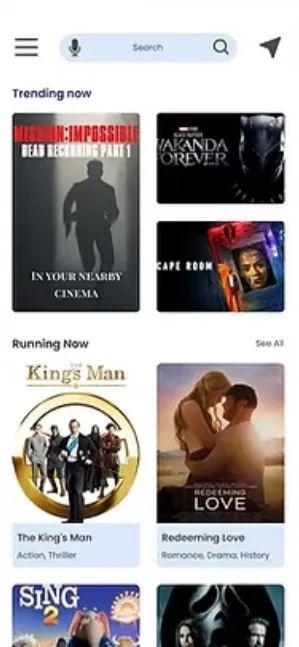
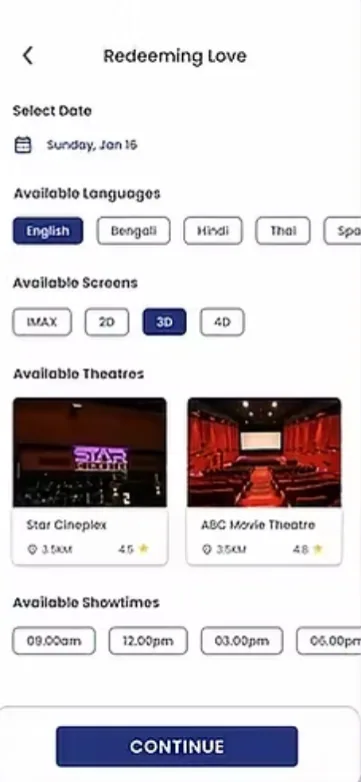
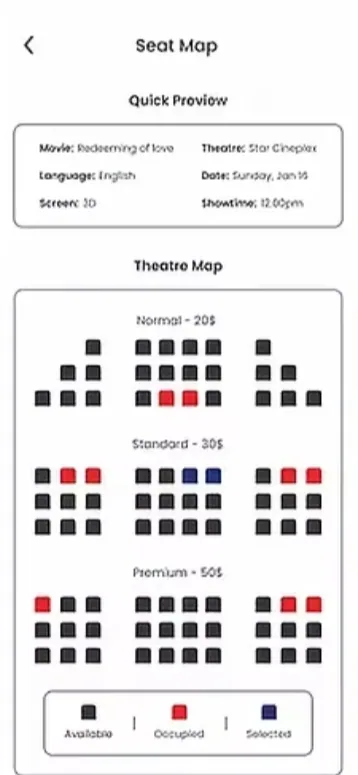
At a glance
The problem
Existing ticketing apps don’t let moviegoers pre-book tickets before a movie’s release or bookmark movies for later, leaving a frustrating, fragmented experience.
The approach
I used personas to pin down moviegoers’ frustrations, designed advance booking, bookmarks, and trailers to answer them, and refined the app over three rounds of usability testing.
The outcome
All eight participants in an unmoderated test of the final design completed their tasks with ease, and two said they found it fun to use.
Key results
- 3rounds of testing, from low-fi prototype to final design
- 8/8participants completed their tasks with ease
- 3accessibility features, from voice input to languages
Overview
I wanted Cinematica to go beyond the ticket and fill the gaps other ticketing apps leave open.
The Product
Cinematica is a movie theater seat reservation app that streamlines booking. Beyond reservations, users can pre-order food and drinks for their visit.
The Problem
Existing ticketing apps leave users frustrated, with a fragmented experience:
- No advance booking: Users can’t book tickets before a movie’s release.
- No bookmarks: There’s no way to save movies to watch later.
The Goal
An intuitive app for browsing nearby theaters, booking tickets, reserving seats, pre-ordering food, and bookmarking favorite movies, meeting needs other apps leave unmet.
Understanding the User
Every pain point users raised became a design decision, from booking before release day to a focus on stability.
Pain Points
- Advance booking: Users couldn’t book before a movie’s release, so the app lets them view and book tickets for upcoming movies.
- Bookmarks: Users wanted to save movies for later, so I added bookmarks they can reserve tickets from directly.
- Connection issues and bugs: Users worried about the reliability of existing apps, so I prioritized stability and performance.
- Missing trailers: Many apps lacked trailers, which users valued, so the app lets them watch trailers before booking.
Research Approach
I worked in phases, starting with personas to understand users’ frustrations and wants when booking movie tickets. Feedback from a usability test of the low-fidelity prototype then helped make the experience intuitive and accessible to a broad audience.
Personas
Different needs, same requirement: reliability came up in every persona and again in the journey map’s user goal.
Robert, an electrical engineer, needs a bug-free ticket app so he can book from anywhere in the country.
Bianca, a schoolteacher, needs a reliable app to pre-book tickets and pick them up without waiting in line.
Journey Map
User goal: Find a reliable, bug-free app to browse and book tickets for favorite movies efficiently.
Design Process
Research set the priorities: the screens start from what users came to do, and a low-fidelity prototype put them in front of users early.
Low-Fidelity Wireframes
The first wireframes centered on the main tasks users wanted to accomplish and made those tasks easy. They grew out of brainstorming sessions and surveys, grounded in the user research data.
High-Fidelity Wireframes
I then developed them into high-fidelity wireframes that show the app’s structure and flow in more detail.
Low-Fidelity Prototype
I turned the digital wireframes into a low-fidelity prototype for the first round of usability testing.
Usability Testing
Two rounds of testing, five people each, exposed friction in the basics: choosing a showtime, signing in, paying, and placing the search bar.
Findings
- Round 1 — low-fidelity prototype, five participants
- Choosing a theater, date, and showtime needed to be simpler.
- Users wanted more sign-in options and scannable payment methods.
- Round 2 — high-fidelity prototype, five participants
- The search bar needed a more convenient placement.
- The logout button needed to be reachable from the menu.
- The bookmark icon had to work and be easy to use.
Refined Screens
I refined the screens around these findings so every key feature is easy to access and use.
Final Design
With the testing fixes in place, the final design also widens who can use the app.
Final Mockups
The polished version of the app, with the changes from usability testing in place.
High-Fidelity Prototype
I built this prototype for the second round of usability testing, with five participants.
Accessibility Considerations
- Voice assistive technology: Supports users who can’t type.
- Language options: Multiple languages for users who aren’t proficient in English.
- Seat and screen types: A range of options for a diverse user base.
Going Forward
The finished design held up, and the project taught me where good design starts: with user research.
Impact
All eight participants finished their tasks with ease in the third, unmoderated usability test, which ran on the finalized design. Two said they found the interface fun to use.
What I Learned
This project showed me that user research gathers the data good design depends on. Wireframing shaped the app’s UI, and usability studies were crucial to refining it.
I really enjoyed interacting with the interface and found it easy to book tickets.